

A family member visits your district website to find enrollment requirements, check transportation information, or figure out who to contact. A chatbot can make that information easier to find, especially when district offices are closed.
Before implementing one, get clear on the experience you want to provide. Do you want it to answer public-facing questions and direct families to resources? What happens when someone needs more assistance? What if it could also support teacher and staff inquiries?
These five questions can help your district evaluate a solution’s immediate usefulness and its potential to support additional needs over time.
1. What district information can it use?
Useful answers depend on access to the right information. For a public website chatbot, that might include enrollment instructions, transportation policies, school calendars, and department contacts.
Ask which sources the solution can use and whether it can show where an answer came from. For example, can it explain enrollment requirements using both your registration webpage and a linked document, then direct the parent to the relevant source?
If you also want to support employee questions, ask whether the solution offers a separate, authenticated experience. Staff may need information from internal HR documents or IT procedures that should not be available to public website visitors. Find out how the solution identifies users and limits access to authorized information.
Demo Request: Have the vendor answer a parent’s question using your public sources. If employee support is in scope, ask it to demonstrate how internal information is restricted to authorized staff.
2. How does it keep answers accurate and current?
Accurate answers depend on reliable sources and how the solution uses them. Forms change, procedures evolve, and two documents may give different instructions. Someone still needs to own the accuracy of the source material. Ask whether answers stay grounded in approved district information and what happens when that information is missing or unclear.
Find out whether your team will need to maintain a separate collection of chatbot answers or whether the solution can work from your existing sources. If your district updates its enrollment requirements or replaces a registration form, will someone also need to update the chatbot? Ask how quickly changes become available and whether the solution can flag conflicting information for review. When it cannot find a reliable answer, it should acknowledge that limitation and offer a useful next step.
Demo Request: Test a question with a known answer, then one your sources do not answer. Change a source document and check how the update becomes available. Present conflicting deadlines and see whether the solution flags the issue rather than confidently choosing one.
3. What should happen when someone needs more than an answer?
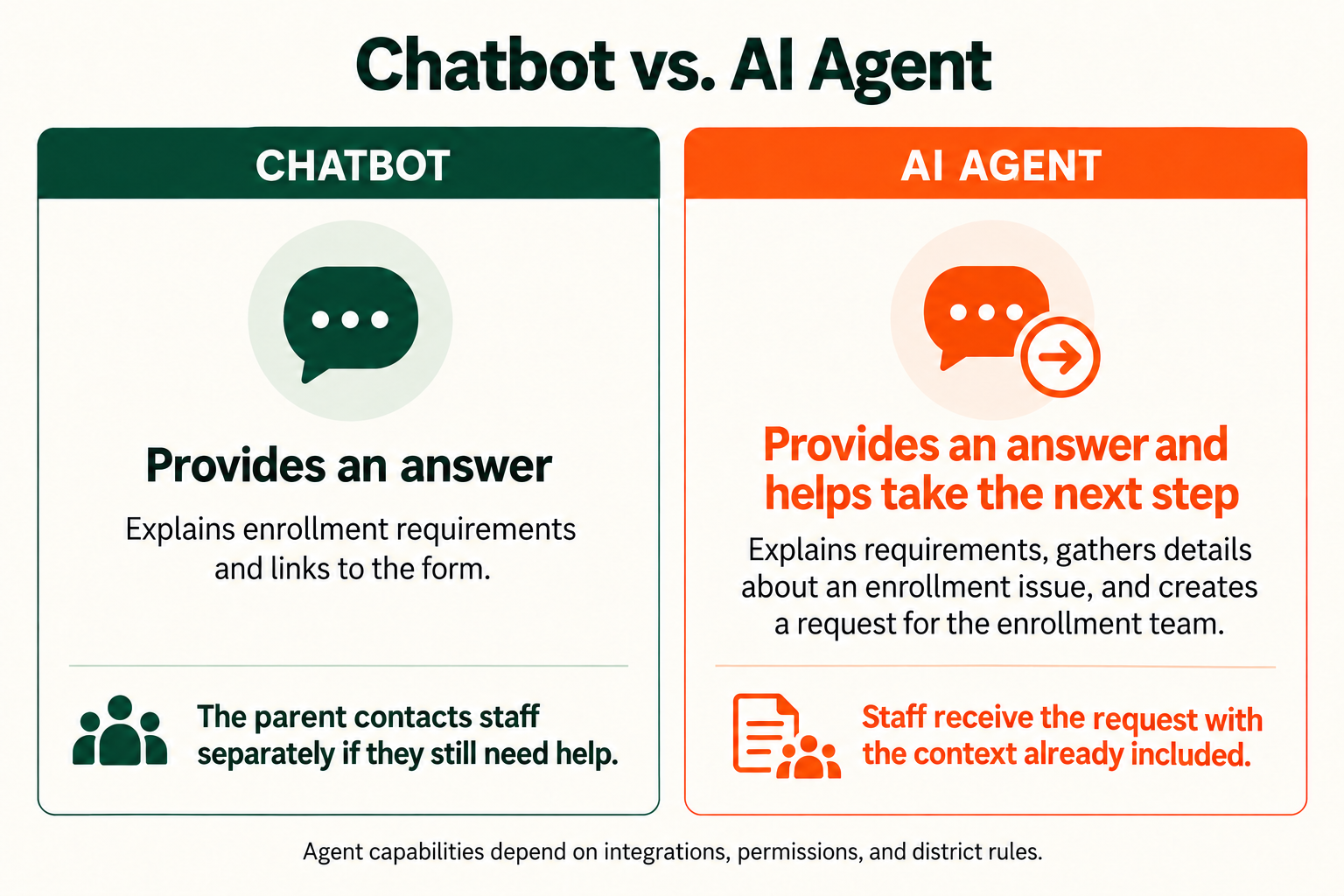
A parent asking how to enroll a student may only need instructions and a link. But a parent who cannot complete a required step may need help from the enrollment team.
Ask what happens at that point. Does the chatbot provide contact information and leave the parent to send an email or make a call? Or can the solution collect a description of the issue and create a request for staff assistance?
Some AI agents can take these steps through connections to district systems. For example, an agent could gather the information needed to describe an enrollment issue and submit it to the appropriate team. That gives staff context before they respond and saves the parent from explaining the problem again.
Demo Request: Present an enrollment question that requires staff assistance. See what the solution can do after providing an answer, what requires setup, and how the parent knows their request was received.
4. How does it improve your existing support process?
When a family needs staff assistance, the request should reach the right team through a process they already use, with the information needed to respond. The same question applies to internal staff support: when guidance does not solve the problem, can the solution move the request into your existing helpdesk?
For example, a teacher who cannot log in to a district application could ask for help. The solution could explain how to reset the password and direct the teacher to the district’s approved reset tool. If that doesn’t solve the problem, it could gather details about the issue and create a helpdesk ticket, saving the teacher from finding another form and explaining everything again.
Demo Request: Ask for help resetting a password, then explain that the suggested steps did not work. Can the solution create a helpdesk ticket with the details already collected? Inspect what the technician receives. If the solution can perform the reset itself, ask the vendor to demonstrate how it verifies the user’s identity.
5. Who owns it, and how does human oversight work?
A district chatbot needs clear ownership across the teams responsible for its content and operation. Comms might oversee public-facing information, IT might manage access and integrations, and departments remain responsible for their source material. Agree on who reviews questionable answers, coordinates corrections, and checks that issues are resolved.
Some questions have no clear answer. If two district documents give different instructions, the solution should acknowledge the conflict and direct the user to someone who can clarify it rather than present one answer as certain. Define how users reach a person when they need help.
Actions also need boundaries. A solution might collect a family question and send it to the enrollment team, while leaving decisions about eligibility or exceptions to staff. For internal support, an application access request might be submitted automatically but still require a manager’s approval before access is granted. Ask how those rules are enforced, how district data is protected, and whether staff can review a record of the information used and actions taken.
Demo Request: Present a question the solution cannot reliably answer and a request that requires human approval. See how it escalates the question and waits for approval.
When an Answer Isn’t Enough
A website chatbot can be valuable when families need quick answers and help finding district resources. As you evaluate options, though, you should also consider what happens when that information doesn’t resolve the user’s need.
For example, an answer-focused chatbot might explain enrollment requirements and link to a form. But an AI agent with the appropriate connections and permissions could also collect details about a parent’s issue and initiate a request for staff assistance.
The distinction is not simply whether a solution understands a question or remembers a conversation. It’s whether it can take the next step in a connected district system, within the rules your district sets.
That capability may also extend to internal support, such as creating an IT ticket from a teacher’s description of a damaged device.
You do not have to begin with every use case. Start with the audience and needs you want to serve, then evaluate what each solution can do today and what would be required to expand.
>> Read Beyond Answers: How AI Can Turn District Knowledge Into Action to see how AI agents can do more than just answer district questions.

.png)