

For years, district IT teams have worked to improve familiar support metrics: faster response times, shorter resolution times, better SLA performance, greater technician productivity.
Improving these metrics is important. When a teacher can't access an application or a staff member's device isn't working, resolving the problem quickly helps people get back to work sooner.
But they only address part of the capacity problem facing district IT teams. There's another question worth asking: How much of the work your IT team is doing needs to be done by them?
Why Faster IT Ticket Resolution Doesn't Always Improve IT Capacity
Imagine your district IT team receives 1,600 requests in a typical month. You improve workflows and give technicians better tools. As a result, average resolution time drops significantly.
That's meaningful progress.
But your team is still processing 1,600 requests.
Some of those requests may be necessary. Others represent unnecessary work that could have been avoided altogether. For example, your IT team may be answering questions employees could have answered themselves, redirecting requests that belong to another department, or spending time collecting information that could have been provided upfront.
What if some of that work could be eliminated?
If the goal is to regain meaningful technical capacity, district technology leaders need to look beyond how efficiently tickets move through the queue and consider how much work is entering the queue in the first place.
Why School District IT Teams Receive Unnecessary Support Tickets
District employees don't always know where to go when they need help.
They may not know whether an issue belongs to IT, HR, facilities, finance, or another department. They may not remember which portal, email address, form, or system they're supposed to use. They may also need help too urgently to follow established processes.
So they go where they know they'll get a response.
Often, that's IT.
As a result, district technology teams can become the default destination for questions and requests that aren't necessarily technical. IT staff can find themselves answering questions about processes, redirecting requests to other departments, tracking down missing information, or helping employees figure out where to go next.
None of these tasks is especially burdensome in isolation. At district scale, however, they can consume a meaningful amount of your team’s technical capacity.
4 Types of Hidden Work That Increase IT Support Demand
The number of tickets in your queue tells you how many requests your team is handling. It doesn't necessarily tell you how much additional work those requests generate.
We call this Hidden Work. It’s the additional operational effort required to compensate for fragmented support experiences, disconnected systems, and the manual coordination needed to deliver district services.
Hidden Work commonly shows up in four ways.
1. Answering repetitive questions
District IT teams often receive questions with known answers: how to reset a password, access a system, connect to Wi-Fi, or complete a common process.
When employees can't easily find or trust the answer themselves, someone on the IT team has to provide it. Each interaction may take only a few minutes, but over the course of a school year, those minutes add up.
2. Manually routing requests
Not every request that reaches IT is an IT responsibility, and even legitimate IT requests don't always reach the right person initially.
Someone has to review the request, determine who owns it, forward or reassign it, and sometimes explain to the requester where the issue belongs. In these situations, IT isn't actually resolving the problem; it’s helping the request find its destination.
3. Chasing missing information
It’s not uncommon for requests to arrive without the context required to act on them.
“My Wi-Fi isn't working” might require IT to determine which device the employee is using, where they're located, which network they're trying to access, when the problem began, and whether anyone else is experiencing it.
Each follow-up for more information creates another interaction before troubleshooting can even begin.
4. Coordinating work across departments
Some requests legitimately require multiple people or departments to resolve. The unnecessary work comes from the manual coordination required to connect those pieces.
When systems and processes are fragmented, IT staff can end up being the ones who track down information, contact other departments, follow up on progress, and keep the requester informed. The actual technical task may be relatively simple, while the coordination surrounding it takes considerably more time.
How to Reduce IT Ticket Volume, Not Just Resolution Time
Once you start looking at IT support through the lens of work reduction, the question changes.
Instead of asking, “How can we resolve this ticket faster?”
You ask, “How much human work should this request require?”
That creates a different hierarchy for improving IT support.
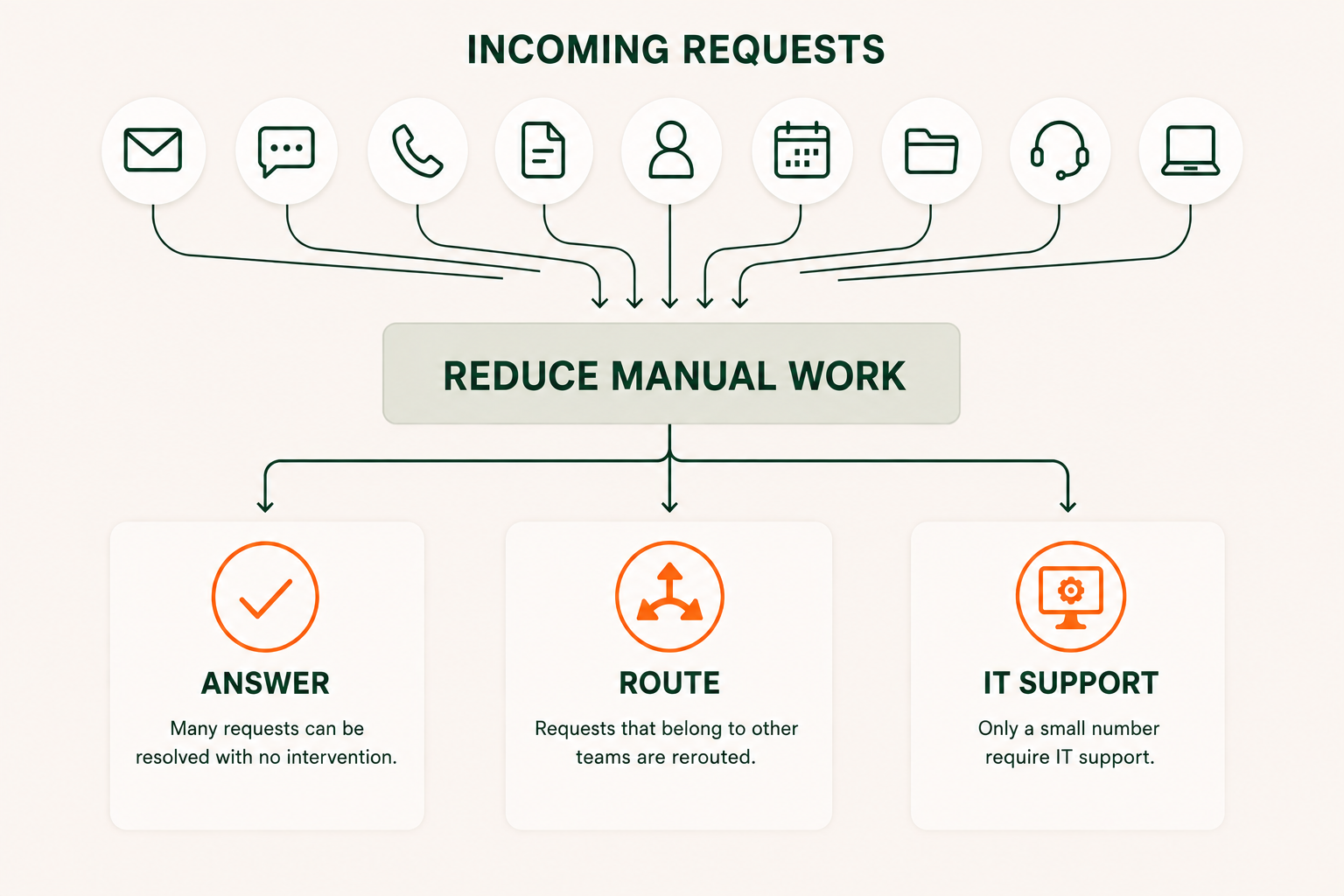
First, can you prevent the request by making trusted information easier for employees to access?
If the request still needs to happen, can it be answered or resolved without requiring a person?
If human involvement is necessary, can you collect the right information upfront so the technician doesn't have to chase it later?
Can the request reach the right person or department immediately, so IT doesn’t have to manually reroute it?
And when multiple teams need to be involved, can you reduce the manual coordination required to move the work forward?
Only after eliminating the work that doesn't need to happen does it make sense to focus exclusively on making the remaining work faster.
This isn't about reducing ticket counts to improve a dashboard. It's about conserving technical capacity for work that actually requires it.
From IT Ticket Management to IT Work Reduction
Traditional help desks are designed to manage tickets efficiently, and districts need that capability. Requests have to be tracked, assigned, prioritized, and resolved reliably.
But ticket management begins after someone has already asked for help.
A work-reduction approach starts further upstream.
Why did the employee need to submit the request? Why did it reach IT? Was the answer already available somewhere? Was the request routed correctly? Did it contain enough information to act on? How many people had to coordinate behind the scenes before the employee got what they needed?
Those questions reveal something traditional support metrics often don't: the total amount of human effort required to deliver support. As budgets are squeezed and teams must do more with the resources they have, reducing unnecessary human effort can free capacity for work that requires IT expertise.
When a district eliminates an unnecessary request, no one needs to spend time routing it, prioritizing it, assigning it, resolving it, documenting it, or closing it. A question answered without staff involvement gives time back to both the employee asking it and the IT team that would otherwise have responded. And a request that reaches the right team with the right context from the beginning eliminates another set of manual steps.
Fewer Support Tickets Mean More IT Capacity
District IT teams will always have important work to do. Systems will fail. Devices will break. Security incidents will demand attention.
The goal isn't zero tickets.
The goal is to stop consuming skilled technical capacity on work that doesn't require technical expertise.
That means expanding the definition of IT support efficiency beyond how quickly tickets move through the queue.
Because sometimes the biggest opportunity to improve IT support isn't resolving work faster.
It's eliminating the work in the first place.
How much work is hiding within your IT ticket queue?
Ticket volume doesn't tell the whole story. Learn how manual routing, repetitive questions, missing information, and cross-department coordination quietly consume district IT capacity.
Learn more about Hidden Work
Calculate your Hidden Work

.png)